import pandas as pd

df = pd.read_csv("data/ml-ready/cdi-customer-churn.csv")

X = df.drop(columns="churn")
y = df["churn"]Model Evaluation
Evaluation Is Not a Decoration
A model is not useful because it produces predictions.
It is useful if:
- it generalizes to new data
- its errors are acceptable in context
- the evaluation matches the real decision goal
This lesson focuses on disciplined evaluation for classification models.
Load Data
Train/Test Split
from sklearn.model_selection import train_test_split

X_train, X_test, y_train, y_test = train_test_split(
    X,
    y,
    test_size=0.2,
    random_state=42,
    stratify=y
)
Define Preprocessing
from sklearn.compose import ColumnTransformer
from sklearn.preprocessing import OneHotEncoder, StandardScaler
from sklearn.pipeline import Pipeline

numeric_features = X.select_dtypes(include=["int64", "float64"]).columns
categorical_features = X.select_dtypes(include=["object"]).columns

numeric_transformer = Pipeline(
    steps=[("scaler", StandardScaler())]
)

categorical_transformer = Pipeline(
    steps=[("encoder", OneHotEncoder(handle_unknown="ignore"))]
)

preprocessor = ColumnTransformer(
    transformers=[
        ("num", numeric_transformer, numeric_features),
        ("cat", categorical_transformer, categorical_features)
    ]
)
Train a Baseline Classifier
from sklearn.linear_model import LogisticRegression

clf = Pipeline(
    steps=[
        ("preprocessor", preprocessor),
        ("classifier", LogisticRegression(max_iter=1000))
    ]
)

clf.fit(X_train, y_train)
Pipeline(steps=[('preprocessor',
ColumnTransformer(transformers=[('num',
Pipeline(steps=[('scaler',
StandardScaler())]),
Index(['tenure_months', 'monthly_spend', 'support_calls'], dtype='str')),
('cat',
Pipeline(steps=[('encoder',
OneHotEncoder(handle_unknown='ignore'))]),
Index(['customer_id', 'contract_type', 'autopay'], dtype='str'))])),
('classifier', LogisticRegression(max_iter=1000))])In a Jupyter environment, please rerun this cell to show the HTML representation or trust the notebook. On GitHub, the HTML representation is unable to render, please try loading this page with nbviewer.org.
Parameters
Parameters
Index(['tenure_months', 'monthly_spend', 'support_calls'], dtype='str')
Parameters
Index(['customer_id', 'contract_type', 'autopay'], dtype='str')
Parameters
Parameters
Predictions and Probabilities
import numpy as np

y_pred = clf.predict(X_test)
y_prob = clf.predict_proba(X_test)[:, 1]

y_pred[:10], np.round(y_prob[:10], 3)
(array([0, 1, 1, 1, 1, 1, 1, 1, 0, 1]),
array([0.345, 0.666, 0.649, 0.827, 0.811, 0.825, 0.768, 0.57 , 0.411,
0.666]))Confusion Matrix
A confusion matrix breaks predictions into four counts:
- True positives (TP)
- False positives (FP)
- True negatives (TN)
- False negatives (FN)
from sklearn.metrics import confusion_matrix

cm = confusion_matrix(y_test, y_pred)
cm
array([[19, 39],
[19, 83]])cm_df = pd.DataFrame(
cm,
index=["Actual 0", "Actual 1"],
columns=["Pred 0", "Pred 1"]
)
cm_df| Pred 0 | Pred 1 | |
|---|---|---|
| Actual 0 | 19 | 39 |
| Actual 1 | 19 | 83 |
Accuracy Can Be Misleading
Accuracy answers:
How often was the prediction correct?
Accuracy can be misleading when:
- classes are imbalanced
- false positives and false negatives have different costs
For churn, missing a true churner (false negative) can be more costly than contacting a customer who would not churn (false positive).
Precision, Recall, and F1
from sklearn.metrics import accuracy_score, precision_score, recall_score, f1_score

accuracy = accuracy_score(y_test, y_pred)
precision = precision_score(y_test, y_pred)
recall = recall_score(y_test, y_pred)
f1 = f1_score(y_test, y_pred)

accuracy, precision, recall, f1
(0.6375, 0.680327868852459, 0.8137254901960784, 0.7410714285714286)Interpretation:
- Precision: among predicted churners, how many truly churned?
- Recall: among true churners, how many did we catch?
- F1: balance between precision and recall
Classification Report
A classification report summarizes key metrics per class.
from sklearn.metrics import classification_report

print(classification_report(y_test, y_pred, digits=3))
precision recall f1-score support
0 0.500 0.328 0.396 58
1 0.680 0.814 0.741 102
accuracy 0.637 160
macro avg 0.590 0.571 0.568 160
weighted avg 0.615 0.637 0.616 160
Thresholds Change Behavior
By default, class predictions use a threshold of 0.5.
Lower thresholds often increase recall.
Higher thresholds often increase precision.
def predict_with_threshold(probs, threshold=0.5):
    return (probs >= threshold).astype(int)
thresholds = [0.3, 0.5, 0.7]
rows = []
for t in thresholds:
y_t = predict_with_threshold(y_prob, threshold=t)
rows.append({
"threshold": t,
"precision": precision_score(y_test, y_t),
"recall": recall_score(y_test, y_t),
"f1": f1_score(y_test, y_t)
})
pd.DataFrame(rows)| threshold | precision | recall | f1 | |
|---|---|---|---|---|
| 0 | 0.3 | 0.647059 | 0.970588 | 0.776471 |
| 1 | 0.5 | 0.680328 | 0.813725 | 0.741071 |
| 2 | 0.7 | 0.786885 | 0.470588 | 0.588957 |
ROC Curve and AUC
The ROC curve shows performance across thresholds.
import matplotlib.pyplot as plt
from sklearn.metrics import roc_curve, roc_auc_score

fpr, tpr, thr = roc_curve(y_test, y_prob)
auc = roc_auc_score(y_test, y_prob)

auc0.6511156186612576fig, ax = plt.subplots()
ax.plot(fpr, tpr)
ax.set_xlabel("False Positive Rate")
ax.set_ylabel("True Positive Rate")
ax.set_title("ROC Curve")
plt.show()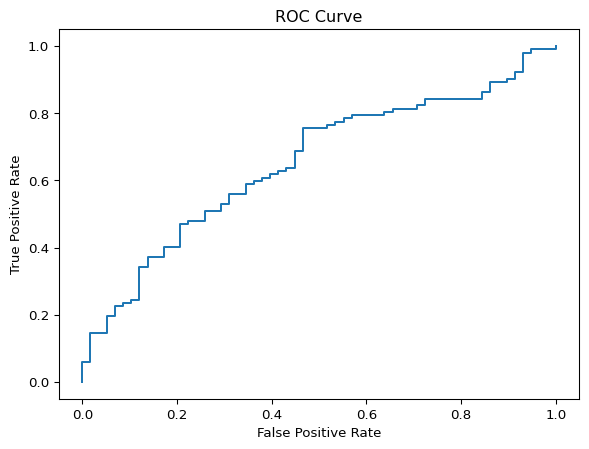
AUC ranges from 0.5 (no skill) to 1.0 (perfect separation).
Precision–Recall Curve
When the positive class is rare, ROC curves can look optimistic.
Precision–Recall curves focus directly on:
- precision
- recall
from sklearn.metrics import precision_recall_curve, average_precision_score

p, r, t = precision_recall_curve(y_test, y_prob)
ap = average_precision_score(y_test, y_prob)

ap0.776966011701467fig, ax = plt.subplots()
ax.plot(r, p)
ax.set_xlabel("Recall")
ax.set_ylabel("Precision")
ax.set_title("Precision–Recall Curve")
plt.show()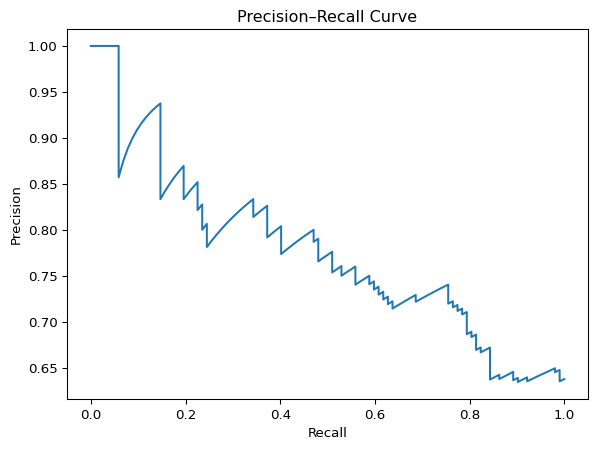
Average precision summarizes the PR curve in a single number.
Cross-Validation
A single train/test split can be noisy.
Cross-validation provides a more stable estimate of generalization.
from sklearn.model_selection import cross_val_score

scores = cross_val_score(clf, X, y, cv=5, scoring="f1")
scores, scores.mean()
(array([0.74782609, 0.75862069, 0.80869565, 0.74178404, 0.79475983]),
np.float64(0.7703372583343606))Looking Ahead
In the next lesson, we focus on overfitting and regularization.
The goal is not to chase metrics.
The goal is to build models that generalize.